| Use Website Scanner to scan any
given web site and produce a list of links (including
htm cgi php asp jsp jpg gif mp3 mpeg exe zip rar
swf and more file types) found in the site, using
several criteria to filter the results.
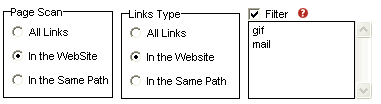
You can define the Scan Page Type and Link
Type to limit the results. If you just want
to scan some special file types (e.g. : jpg,gif,mpg,mp3,email,exe
) you can use the filter.
1.Enter the file type name as the filters
For example, if you enter "gif" and
"jpg", Website Scanner will only scan
the gif file and jpg file.
Please note: For jpeg use "jpg" and
for mpeg use "mpg" (Website Scanner
converts jpeg in jpg and mpeg in mpg automatically).
2.Scan email address
You must enter "mail" in the Filter
Box. |